

Typography isn’t just about letters — it’s about personality, emotion, and digital identity. Whether you’re designing a social media post, creating a logo, writing a blog headline, or customizing your gaming username, the right font instantly transforms your message. That’s where Text to Font generators come in.
In 2025, text-to-font tools have become essential for creators, designers, students, marketers, and anyone wanting to add style to their digital text. These tools turn plain text into beautiful, unique, and custom-styled fonts — without needing Photoshop, Illustrator, or any design expertise.
This in-depth guide covers everything you need to know about Text to Font tools, how they work, the best platforms to use, popular font types, advanced customization tricks, and expert recommendations for design, branding, social media, and digital use. Let’s dive in.
Table of Contents
What Is a Text to Font Generator?
A Text to Font generator is an online tool or software that transforms plain text into stylized fonts. The tool applies pre-designed typeface templates to your text, allowing you to convert boring characters into aesthetic, creative, and visually appealing typography.
These tools are commonly used for:
- Social media bios and captions
- YouTube channel branding
- Gaming usernames
- Digital invitations
- Website headings
- Logos and content design
- Posters, flyers, and marketing campaigns
Modern text-to-font platforms offer real-time previews, downloadable files, and multiple styles ranging from modern to vintage, neon to handwriting.
Redmi Note 14 5G Review: Full Specs, Features & Must-Know Upgrades Revealed
How Text to Font Tools Work (Simple Breakdown)
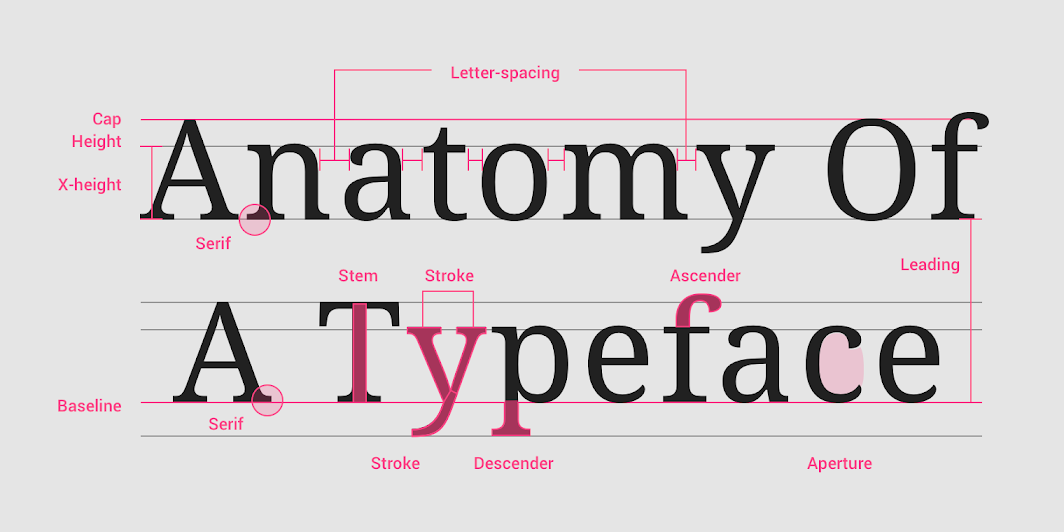
Text-to-font engines typically rely on three layers:
1. Character Mapping
Each letter of the alphabet is mapped to a custom-designed glyph. When you type, the system swaps your characters with the stylized ones.
2. Style Rendering
The tool applies:
- Typeface style
- Size adjustments
- Weight (boldness)
- Decorative elements
- Ligatures (connected characters)
3. Output Generation
You receive the final text as:
- Copyable text
- Downloadable PNG/SVG
- Web-friendly typography
- Custom font file (in advanced tools)
The process is instant, even for complex scripts.
Why Text to Font Tools Are Trending in 2025
The rise of digital creators, influencers, gamers, students, and freelancers has made custom typography more important than ever. Here’s why these tools are exploding in popularity:
1. Zero Design Skills Required
Anyone can generate stylish fonts without using Adobe tools or advanced software.
2. Social Media Aesthetic Demand
Instagram, TikTok, and YouTube creators want unique visual branding to stand out.
3. Customization for Businesses
Small businesses use stylish fonts for:
- Logos
- Flyers
- Banner ads
- Product packaging
4. Gaming & Streaming
Gamers love stylized text for usernames on:
- Steam
- Discord
- Twitch
- Roblox
- Free Fire
- PUBG Mobile
5. AI-Enhanced Typography
New AI-based tools now auto-suggest designs based on your text style or brand identity.
Dogecoin Price Prediction Guide: What to Expect in 2025 and Beyond
Types of Fonts You Can Generate Using Text to Font Tools

Text to Font generators offer hundreds of styles. Here are the most popular categories:
1. Aesthetic Fonts
Perfect for social media bios, quotes, and captions. Clean, minimal, and modern.
2. Handwriting Fonts
Look like handwritten notes — excellent for diaries, journals, or personal branding.
3. Calligraphy & Script Fonts
Elegant and flowing. Used for invitations, logos, and stylish designs.
4. Bold / Heavy Fonts
Ideal for banners, headings, thumbnails, and attention-grabbing titles.
5. Retro & Vintage Fonts
Used in posters, artistic designs, and classic branding.
6. Gaming & Tech Fonts
Futuristic, glitch-style, and digital-inspired fonts for gaming communities.
7. Fancy Decorative Fonts
Mixes symbols, shapes, and stylized elements to make unique text art.
8. Serif & Sans Serif Fonts
Professional fonts used for documents, essays, websites, and corporate designs.
Ripple XRP Price Prediction Guide: Proven Insights for 2025 and Beyond
Best Text to Font Generators in 2025 (Free & Paid)
Below are some of the most reliable and feature-packed tools today:
1. Canva Text-to-Font Tool
Great for beginners. Offers stunning font templates, design assets, and downloadable outputs.
2. FontSpace Text Generator
Thousands of free font styles. Very popular among students and content creators.
3. CoolSymbol Text Generator
Fast, lightweight, and perfect for social media stylized text.
4. FFonts Converter
Known for professional-quality typography, script fonts, and premium downloads.
5. FlamingText Logo & Font Maker
Used heavily for logo creation and stylized titles.
6. Glyphy Text Tools
Perfect for creators looking for TikTok-friendly fonts.
Each platform offers different strengths—some focus on design, others on pure font transformation.
How to Use a Text to Font Generator (Step-by-Step Guide)
Even if you’re not a designer, you can create stunning text styles in minutes.
Step 1: Choose a Text to Font Generator
Pick a platform like Canva, FontSpace, or CoolSymbol.
Step 2: Enter Your Text
Type the text you want to convert — username, quote, title, etc.
Step 3: Browse Styles
Preview hundreds of font options instantly.
Step 4: Customize Your Font
Adjust:
- Size
- Weight
- Outline
- Shadow
- Color
- Background
Step 5: Export
Save your text as:
- Copy-paste format
- PNG with transparent background
- SVG (for designers)
- JPG (for social media)
You can then use it everywhere online.
iHeartRadio Review 2025 — Is It Still Worth Using?
Advanced Customization Tips (For Designers & Creators)
To make your text stand out even more, try these advanced tricks:
1. Use Contrast
Pair a bold font with a thin font for titles and subtitles.
2. Add Letter Spacing
Increases readability and gives your text an elegant feel.
3. Use Gradient & Metallic Effects
Ideal for thumbnails, banners, and gaming logos.
4. Combine Two Fonts
Mix a serif font with a handwriting script for aesthetic results.
5. Use AI Tools for Suggestions
AI systems can automatically select the best font for your project based on:
- Mood
- Industry
- Purpose
- Color palette
Text to Font for Social Media Branding
Stylized fonts are now essential for growing accounts online. Here’s how creators use them:
- Bio text
- Story covers
- Highlight names
- Reels captions
TikTok
- Profile name
- Video captions
- Aesthetic overlays
YouTube
- Thumbnails
- Channel art
- Video titles
Facebook / Twitter / Threads
- Status text
- Headers
- Custom banners
A unique font style immediately boosts your brand identity.
How to Master BDG Win – Essential Tricks & Best Practices Revealed
Text to Font for Students & Professionals
Students use text-to-font tools for:
- Projects
- Titles
- Presentations
- Posters
- Assignments
Professionals use them for:
- Branding
- Logos
- Marketing materials
- Business documents
The ability to customize text without hiring a designer saves time and money.
Text to Font for Gaming & Streaming
Gamers love stylized fonts for:
- Usernames
- Game profile names
- Livestream overlays
- Discord tags
- Clan names
Popular gaming font styles include:
- Glitch
- Neon
- Cyberpunk
- 3D
- Shadow
- Metallic
A unique font helps players stand out in gaming communities.
Text to Font for Logos & Brand Identity
Many small businesses now use text-to-font tools to create:
- Restaurant logos
- Clothing brand names
- Café signage
- Beauty brand titles
- Event banners
Modern tools allow exporting in high-resolution SVG, perfect for printing and packaging.
Sim Ownership: Complete Guide to Verification, Laws & Digital Privacy (2025 Updated)
Common Mistakes to Avoid When Using Text to Font Tools
1. Using Too Many Fonts Together
Stick to one or two fonts per project.
2. Choosing Unreadable Styles
Aesthetic means stylish, not confusing.
3. Not Matching the Brand Personality
Fonts should reflect brand tone:
- Playful
- Minimal
- Luxury
- Modern
- Professional
4. Overusing Decorative Elements
Too many swirls or symbols can weaken your message.
Top Trends in Text to Font Designs (2025 Edition)
Here’s what’s hot right now:
1. AI-Generated Custom Fonts
Unique fonts created based on your handwriting or brand style.
2. Gradient Metallic Typography
Trending on YouTube thumbnails and TikTok graphics.
3. 3D Realistic Fonts
Used for posters, gaming logos, and large banners.
4. Minimal Sans Serif Branding Fonts
Popular in tech, SaaS, and modern brands.
5. Handwritten Authentic Fonts
Trending in lifestyle, beauty, and wellness content.
Oncepik Insights Explained — Features, Use Cases & Why It Matters in 2025
Should You Use a Text to Font Generator? Final Verdict
Absolutely. Whether you’re a creator, student, business owner, or gamer, text-to-font tools simplify creativity and allow you to design beautiful, professional-quality typography without any technical skills.
You should use a Text to Font generator if you:
- Want stylish text without design tools
- Need aesthetic fonts for social media
- Create content regularly
- Want unique branding
- Need readable, attractive fonts for projects
You may not need one if:
- You are a professional designer already using Adobe Illustrator
- You require fully custom-made fonts
For everyone else, these tools offer incredible value, speed, and creativity.
How to Use Google Block Breaker — Essential Tips & Best Practices (2025 Guide)
FAQs
Is Text to Font safe to use?
Yes — reliable platforms are secure and safe for personal or professional use.
Can I copy and paste custom fonts anywhere?
Most stylized fonts work on Instagram, Facebook, TikTok, YouTube, Discord, WhatsApp, and more.
Can I download the font file?
Some generators allow downloading TTF or OTF font packages.
Are Text to Font tools free?
Many platforms are free; premium options offer advanced effects and high-quality exports.